Church People Counting, Without the Clipboard
Your ushers already count the room. Vitals is where those counts land: logged by service and campus from a phone, or pulled straight from Planning Center headcounts, then turned into attendance trends your team actually looks at.
Start Free TrialNo credit card required · Connects to Planning Center
Where Church Headcounts Go to Die
Counting is the easy part. Keeping the numbers is where most churches lose them.
Sticky Notes and Group Texts
The 9:00 count is on a clicker, the 11:00 count is in someone’s texts, and kids is on a clipboard in the check-in room.
Different Counters, Different Methods
One usher counts the balcony, another doesn’t. Week to week, you can’t tell whether the room grew or the method changed.
Numbers Nobody Sees
A spreadsheet total once a month doesn’t tell you that the 11:00 is nearly full or that summer dipped harder than last year.
How Vitals Keeps Every Count
Use the counting method you already have. Vitals handles the collecting, the totals and the trends.
Planning Center Headcounts, Synced
If your team records headcounts in Planning Center Check-Ins, Vitals pulls them for every event time automatically, alongside kids and volunteer check-ins.
Learn moreA Phone App for Ushers
Staff and volunteers sign in to the free Vitals companion app (iOS and Android), pick their campus, and enter each service’s count for the week.
Learn moreA Live View on Sunday
The Live Attendance page refreshes every 30 seconds with a by-service breakdown, so the front office sees counts as they come in.
Capacity Gauges
Set limits for each space (auditorium, overflow, parking) and see how full every service runs, so you know when it’s time to add a service.
Sunday Morning, Start to Finish
- 1
Count the room the way you already do
Clicker, row count or Planning Center headcount: keep your method, just keep it the same every week.
- 2
Log it once
Enter the number in the Vitals app for that campus and service, or let the Planning Center headcount sync bring it in.
- 3
See it on the dashboard
Totals by service and campus, year-over-year comparisons and capacity, without anyone building a spreadsheet.
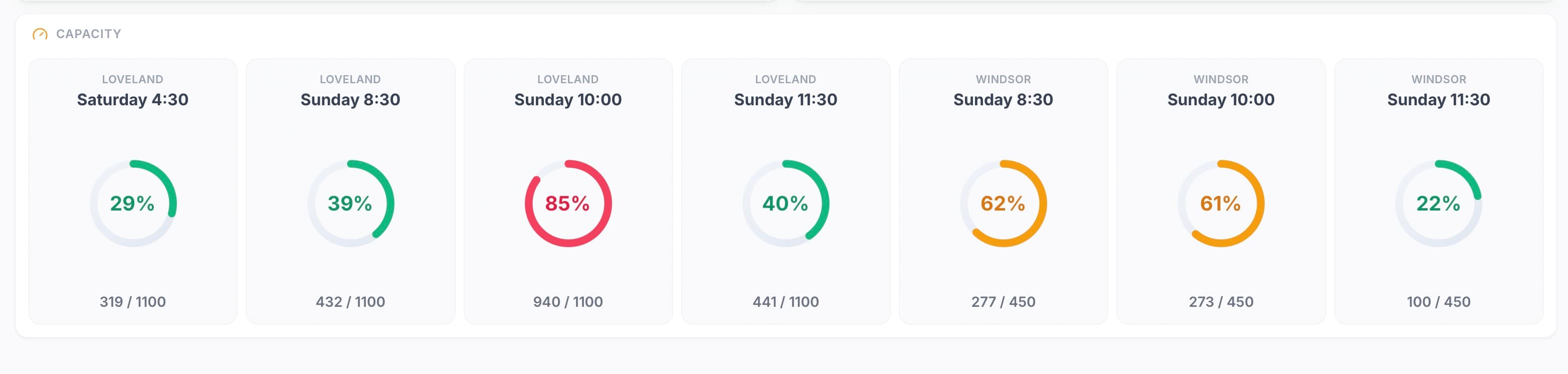
Capacity gauges show how full each service runs against the limits you set.
Frequently Asked Questions
Is Vitals a clicker app?
Does it work with Planning Center headcounts?
Can different campuses and services be counted separately?
Who can enter counts?
Can I tell when a service is getting full?
Explore More Solutions
Church Attendance Tracking
Turn every count into trends by ministry, service and campus.
Church Attendance Follow-Up
See who has stopped coming while there’s still time to call.
Church Attendance Tracking: 4 Methods, Ranked
Clickers, spreadsheets, check-in software or a dashboard.
The Church Metrics Dashboard
Attendance, giving, volunteers and groups in one view.
Give Every Headcount a Home
Connect Planning Center, invite your ushers, and see this Sunday’s counts next to last year’s.
No credit card required · $50/campus/month after trial